If this is a bulk import report, send the spreadsheet to services@wildme.org with the email subject line matching your bug report
In which Wildbook did the issue occur? GiraffeSpotter
What operating system were you using? (eg. MacOS 10.15.3) Windows
What web browser were you using? (eg. Chrome 79) Chrome
What is your role on the site? (admin, researcher, etc) admin
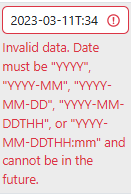
What happened? On bulk import of the xlsx form, if the hour time is 00 then the dttm creation is ignoring the 00 and causing an error that can be manually fixed but the zeros (for midnight) should be retained.
What did you expect to happen?
What are some steps we could take to reproduce the issue?
Hi @CourtneyMarne
Can you send over the spreadsheet? Does this still happen if you convert the xlsx to csv and upload that instead?
Thanks @Anastasia, it did it with 6x bulk imports and all had the same issue. I checked now but no change if csv or csv then back to xlsx, and double checked it’s a numeric field. I have emailed you one of the example spreadsheets.
Thanks!
Thank you for sending your spreadsheet!
It does look like Excel is turning “00” into a single zero when the field type is “General”. I tested by switching it to “Text” and it stopped converting “00” to “0”. It’s supposed to accept both entires as valid, so I’ve written a ticket so we can fix it: Bulk import rejects single digits for Encounter.hour when the value is 0 · Issue #1427 · WildMeOrg/Wildbook · GitHub
In the meantime, the workaround is to convert the field type to Text and replace “0” with “00”. One of the reasons I asked if you tried with csv yet is because it doesn’t tend to do the auto-formatting that xlsx is so fond of and suspected it might be a factor.
Thanks for flagging this. I hope to have an update for you soon.
1 Like
Thanks @Anastasia - it did also work to manually correct in the bulk import table in the process when the error was flagged (adding 00 where it was missed), as I didn’t have very many records. But appreciate the proper fix being implemented
1 Like