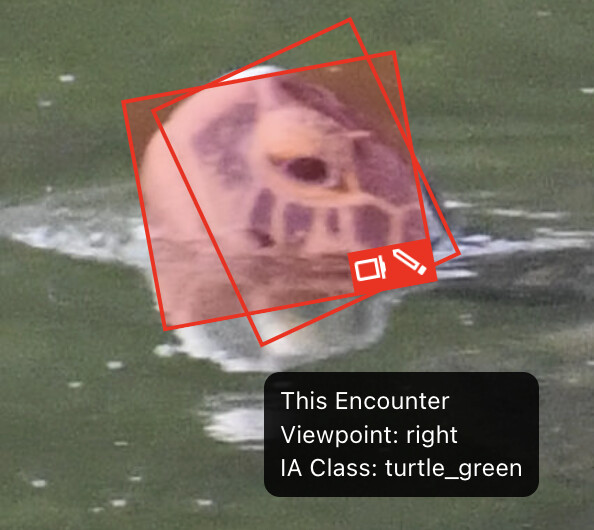
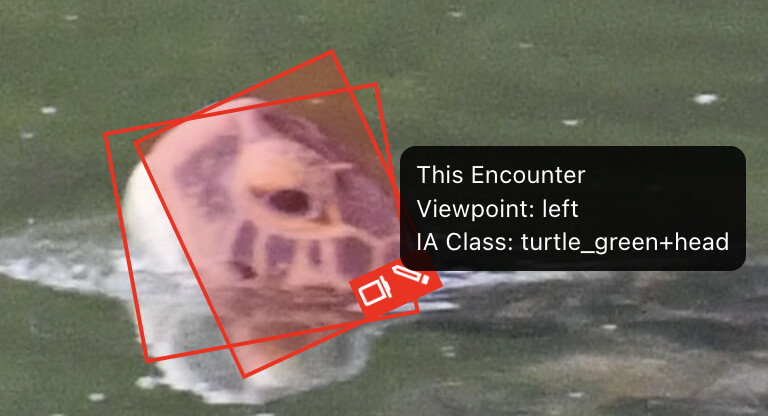
When removing annotations on a cloned encounter, and then deleting that encounter, the initial encounter’s annotation seems to think it belongs to the cloned encounter that I deleted (I know, it’s confusing). I’ll find a cloned encounter that you could use as an example but observed it during editing.
What did you expect to happen?
What are some steps we could take to reproduce the issue?
It looks like it’s trying to create head an body annotations when only heads are present. If you click on an annotation and see IA Class: turtle_green, you can delete it by clicking on the trash icon because that’s the body annotation and no body is present.
IA Class: turtle_green+head is the head annotation that should stay. If you need to edit or reposition it, click on the annotation and then click the pencil icon.
If you have additional examples of heads getting both head and body annotations, let me know so I can share them with the machine learning team and see if detection needs recalibrating.
I think I understand. After the cloned encounter and its annotation are cleaned up, the original encounter still has an annotation that tries to point to the deleted cloned encounter and annotation?
Here’s an example of annotating as right vs left - it’s the left side of the turtle. Also, 2 annotations were created one for head, one for turtle (shouldn’t be there right?)
I’m going to continue to provide annotation examples here. We seem to have regressed with the latest build. I uploaded this small batch of photos and have had quilte a bit of trouble with it. This example (see link below) has 2 annotations, the one says left head, but it’s really the right/front. The other one says turtle (not head) which I understand, it’s a pretty large photo that has a bit of the turtle in it. If things go the way they did earlier, if I remove one of the annotations, they’ll both disappear OR I’ll get a ghost annotation for an encounter that doesn’t exist. See the 1st and 2nd encounter for this import (2nd link down). I’m happy to give you view permission on my items if you don’t have that yet, or even edit so you can observe the behavior… I’m considering this bulk import void for now, I can easily upload again once we resolve some of this.
The logic for assigning annotations post-detection has. That would explain the different observed behavior after the IoT update
Body parts are supposed to be assigned whenever a head part is defined. So seeing body annotations in this case is correct behavior
The next round of detector re-training will include this viewpoint (heads above water) as well as top-down views of shells since these weren’t represented in the initial detector training for turtles. No exact timeline yet, but will likely happen sometime in Q1.
I’m able to edit your encounters as an admin. I’ll likely need to write a ticket for this today so I can link to that import for our devs to test with for now if that’s ok with you.
Are you at least able to edit the viewpoints in the annotations? Clicking the pencil icon on an annotation should let you update the viewpoint and the IA Class if needed.
Yes, in all cases I’m able to edit them using the pencil icon, however, in some cases when I remove (using the trashcan) one of the two annotations, they both disappear. It’s odd, but the team’s trying to work around it and will remove the extraneous photo and then re-annotate.
Yes, feel free to link to that import - I won’t do anything else with it until I hear back from you.
Quick update on this: There are a lot of layers to the annotation weirdness that the devs are trying to untangle and have been able to replicate. This particular issue seems to be a lag between WBIA (part of the image analysis pipeline where annotations are currently processed) and what’s actually displayed in the browser. Long-term, our goal is to stop using WBIA to manage annotations to eliminate the ghost behavior. Short-term, we’re still working on a solution because that’s a big wrench in your workflow.
Thanks for hanging in there while we keep working on it.
In short, there’s evidence that left and right side head viewpoints can be matched to each other in turtles and IoT will be updated next week to account for this.
I’m not sure that for Green Sea Turtles that the left and right can be matched - I was told by a NOAA researcher that these turtles are not symmetrical so the right and left are completely different. I’ve checked at least one turtle and the sides are different.
Maybe other species are more symmetrical, but for us they’re not.
Based on the feedback we’ve gotten so far, we’re not going to match left and right viewpoints on green and hawksbill turtles at this time. We’ll still roll out the updated MiewID v4 in IoT today.
For the mislabeled viewpoints on the green turtles faces, I mentioned it earlier but adding it here so I make sure I don’t miss addressing anything you raised, we’ll include your data in the next round of retraining so the detector will stop getting confused when it sees only a turtle head out of water.
Quick update: we’re going to start retraining the green turtle algorithm on the turtle+head IA class next week. Have you reviewed all of your encounters’ head annotations? I want to share your encounter annotation data with the machine learning team for retraining, but I want to make sure the recent uploads have already been audited by you for accuracy.
It doesn’t look like 20250903 CKD Bulk Import.xlsx was imported yet, but let me know if this should refer to a different file name that I should add the the exclusion list.