If this is a bulk import report, send the spreadsheet to services@wildme.org with the email subject line matching your bug report
In which Wildbook did the issue occur? sharkbook.ai
What operating system were you using? (eg. MacOS 10.15.3) MacOS 10.16
What web browser were you using? (eg. Chrome 79) Brave
What is your role on the site? (admin, researcher, etc) researcher
What happened? I matched a new encounter to an existing shark, then clicked on that shark, but the page only showed a couple of encounters, even though I know we have seen this shark every year for the last 15 years. I then used the search bar to type that shark’s ID, and three results came up. These are all of the same shark, so there should be just one result. On top of that, many encounters were missing. For example, TZ-088 should have encounters for every year 2012–2019, and 2022–2025, but only has a handful of encounters.
What did you expect to happen? To see all encounters of this shark
What are some steps we could take to reproduce the issue? Click in the search bar and type “TZ-088”. I know the resulting encounter list is wrong because we also keep an offline logbook.
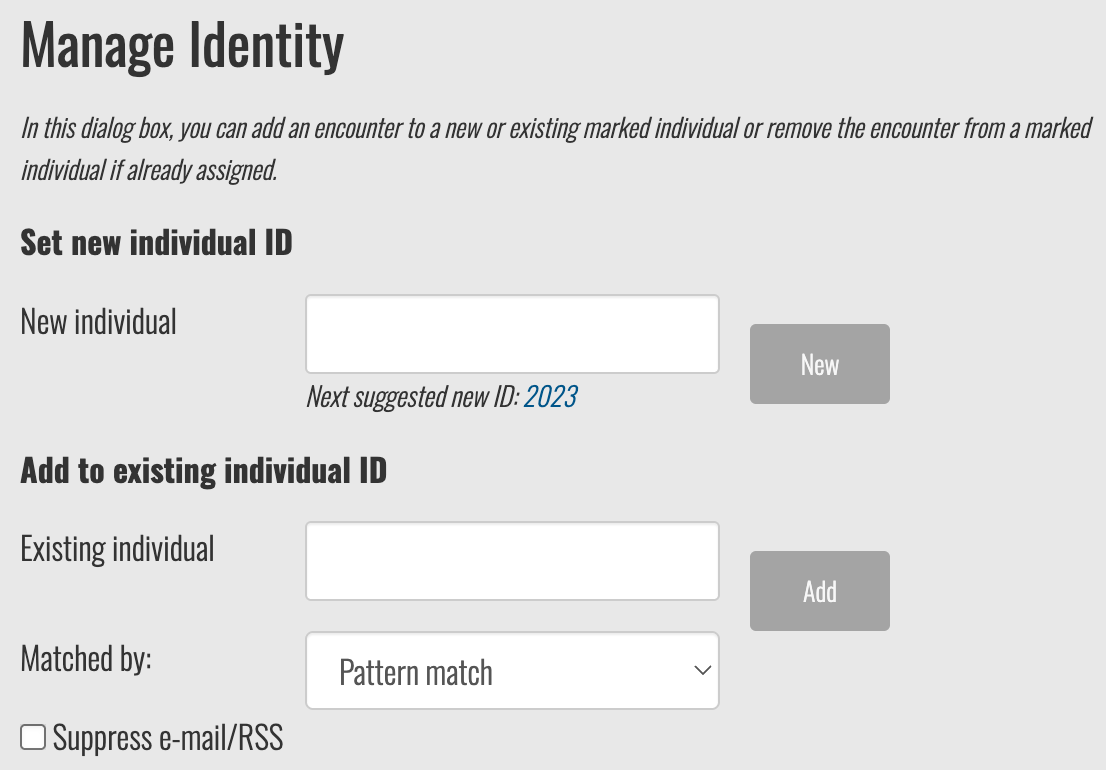
Regarding the 3 Marked Individual pages for TZ-088, this can happen when assigning IDs manually from the Encounter page instead of the match page. If someone enters the ID in the New Individual field instead of using the Add to existing individual ID field, it will create a new individual record with the same name.
It looks like these Marked Individual pages were created on the same day and time in April 18, 2013:
5 encounters: Sharkbook: Wildbook for Sharks (this record was previously merged by you with the Mafia Island account with the above duplicate of TZ-088 in September 22, 2025)
I’m going to merge these records so that the following step of reconciling the missing encounters will be easier. I’ll follow up when the merges are complete.
You can check the Researcher Comments section with your MMF account of the Marked Individual page to see the full list of times encounters were added to or removed from this specific individual page. There’s a known issue where only admins can see the full logs and researchers can only see the logs of the actions they or their collaborators performed: Researcher Comments on Marked Individual Page only visible to admins · Issue #1138 · WildMeOrg/Wildbook · GitHub
I checked all of the encounters in the comments section of each page and listed them below. I excluded deleted encounters and ones that were already assigned an ID. The encounters below appear to have been unassigned from TZ-088 at some point and neither the encounter records or individual records reflect when it happened. I’ll leave it to you to determine if those records are actually of him in case they were removed for being incorrect IDs.
Unassigned encounters previously associated with TZ-088:
Ok, I’ve completed merging the Marked Individual pages. You should now only see one result for TZ-088 when you search in Sharkbook and it will point to this record: Sharkbook: Wildbook for Sharks
I’m guessing that something weird happened when the first merge attempt occurred in September where the encounter records didn’t carry over, but their logs did. It’s not typical for a marked individual page to appear with 0 encounter records. Wildbooks are supposed to automatically delete it when there are no more encounters assigned to it.
After you’ve verified that the encounter list I shared is in fact that same shark, let me know so I can get them assigned correctly.
Thank you for your quick reply. I can confirm that these encounters are from the same shark, so yes please merge them back to TZ-088.
However, this is not an isolated issue for one specific shark. All the sharks I matched yesterday have multiple records when searching in the top-right search bar. The new encounters I added to these sharks yesterday did not go into those existing shark profiles. I should mention that I did select the species as whale shark during the encounter upload. Then, I simply ticked the box of the matching shark in the matching line-up page, and then clicked the box in the top-right to assign that ID. I did not enter a new ID with an existing ID. It seems one result is “TZ-XXX (Rhincodon typus)” and another result is “TZ-XXX” each time when there are two profiles, but others have up to 4 profiles.
Could you please have another look and let me know if I need to do something different in general, or if there is just a bug somewhere? Example sharks to check from yesterday that have two profiles: TZ-173, TZ-053, TZ-087, TZ-034,.
More than two profiles: TZ-191, TZ-163, TZ-169, TZ-065
The answer is both; a little bit of user error mixed in with a bug on our side that doesn’t warn users when they’re creating an individual ID that already exists for that encounter’s taxonomy.
This is fixed. This one actually had 3 marked individual pages. The duplicates appear to have been a result of the user accidentally filling in the “New Individual” field instead of the “Existing Individual” one and creating a new individual page instead of adding the encounter to the existing record.
Ditto above. The easiest way to tell this was an accidentally created duplicate is because the second individual page only has one or two encounters on it. For instances like this, the easiest way to fix it is to open the encounters on the duplicate record, remove the individual from the encounter, refresh the encounter pages, and then reassign the individual now that only one individual page will pop up. As I mentioned upthread, when the last encounter on an individual page becomes unassigned, the duplicate individual page will automatically be deleted. We have a Merging FAQ with these steps as well: Merging FAQ — Wildbook documentation
Similar to the above, you can see the first individual records have a lot of encounters on them, but the duplicate pages only have one or two.
Aside from TZ-088 and TZ-173, I haven’t fixed any of the additional records. I want to make sure you know how to fix simple merges when only one or two encounters need to be corrected per ID. Let me know if you have any additional questions.
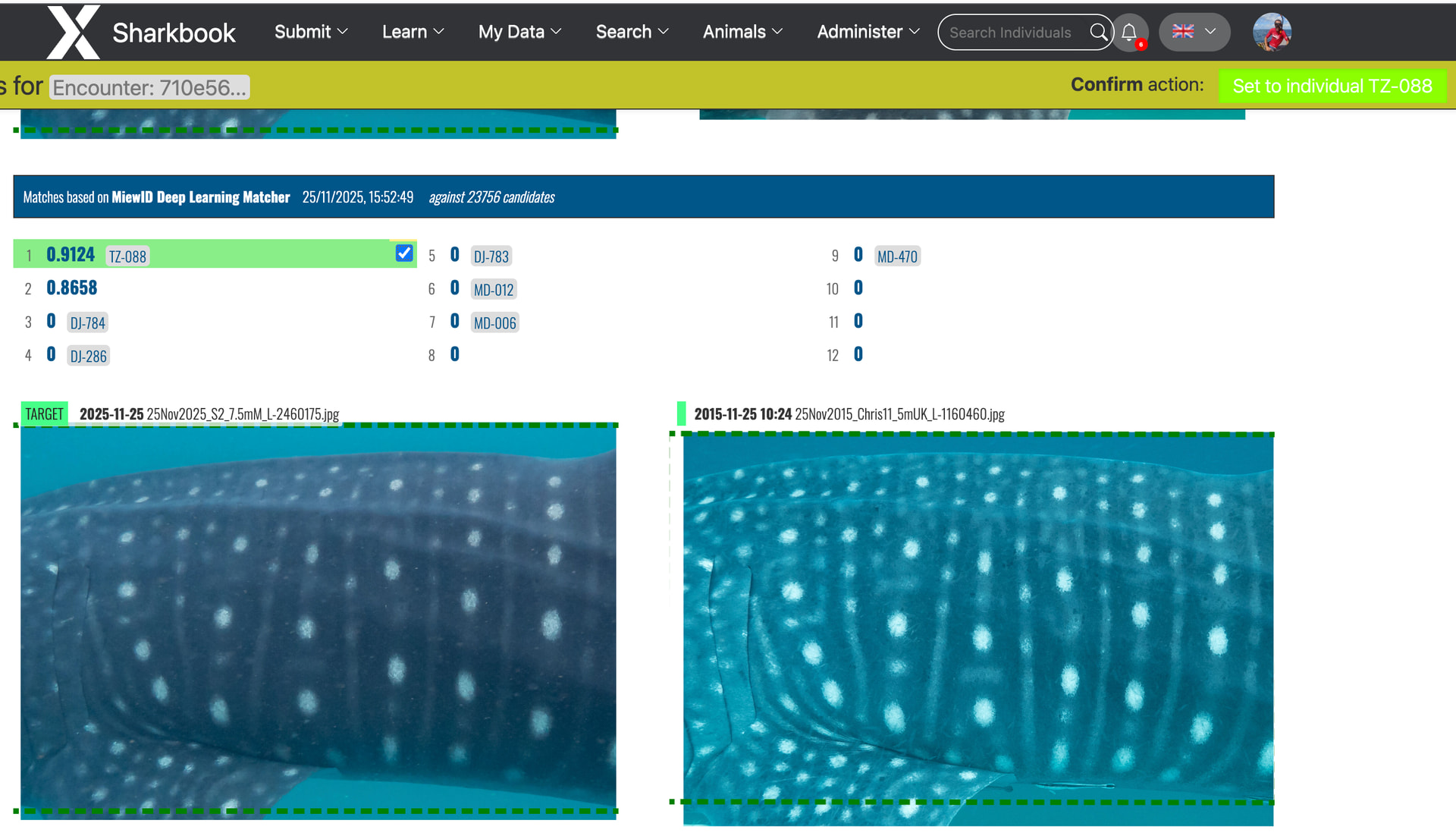
Thanks again for your quick reply. I have now merged these sharks, so they are ok. However, I definitely did not assign an existing ID in the new ID field, at least I am sure for the November 2025 encounters. I only use the matching page to first select the match, and then click in the top-right “Set individual to TZ-XXX”, like in the screenshot here:
I do not use the “Identity” tab in the encounter to assign an existing ID, only if it is a new shark then I check there what the next number should be. So if this approach is correct, there would have to be a bug that makes a new profile for an existing shark when using the matching page to assign the ID. If that approach is not correct, can you please let me know how I should assign an existing ID to a shark instead?
That’s not something that we’ve observed ourselves, but if you happen to test this theory before assigning an ID in the match page by doing a quick search for the individual ID, confirming there only one record that appears, setting the individual on the match page and then checking the quick search bar for the ID again to see if a second record for the same individual appears and sharing your examples here, that would give our devs something more concrete to work with.
We haven’t gotten other reports of accidental duplicates in Sharkbook, and I’ve not been able to replicate this after some testing. If there is an intermittent bug occurring during match page ID assignment, having a specific new example of that can help us pinpoint where to start troubleshooting.
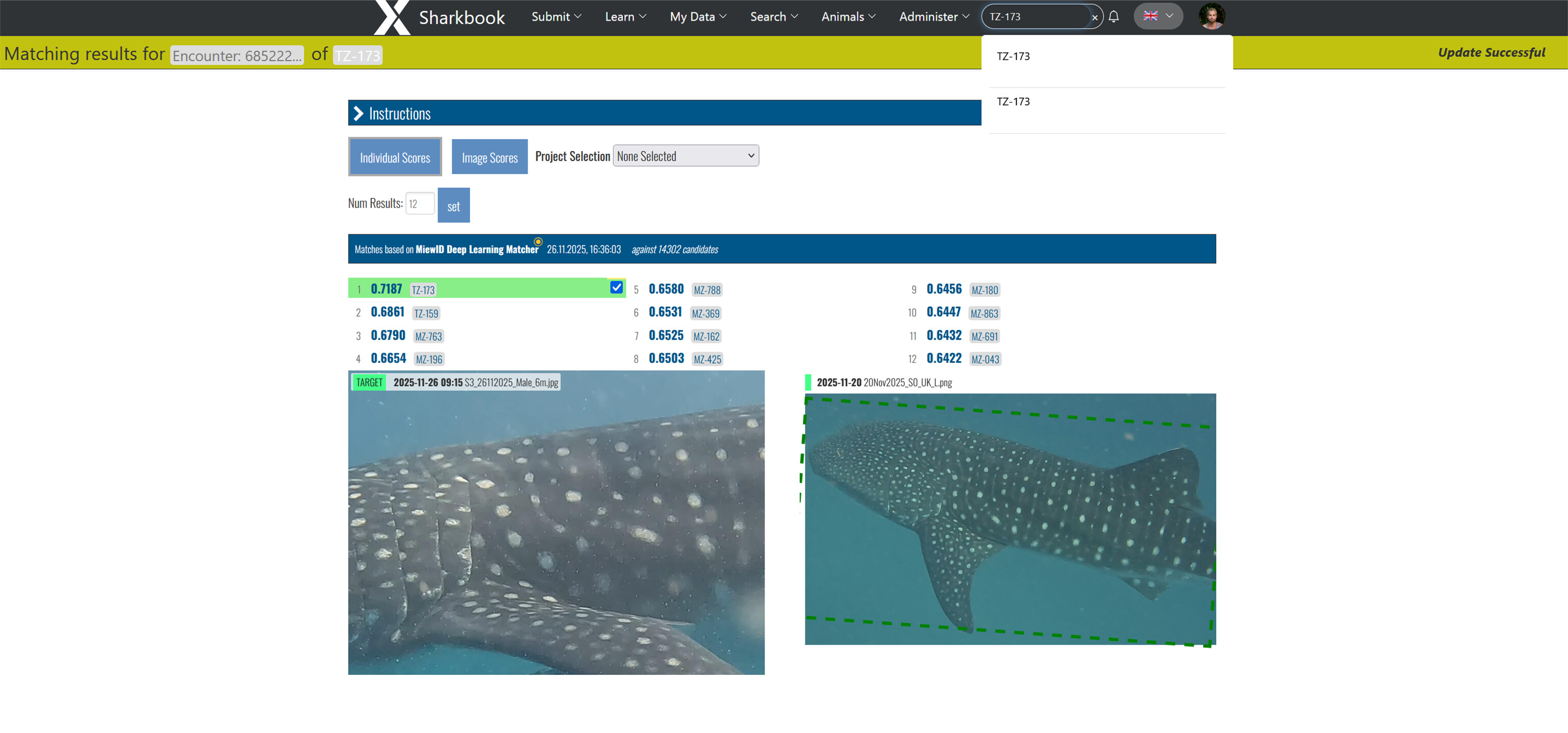
Ok, so we did what you described above, this time under Jens’ login: There was only one profile page for TZ-173; then we matched the shark from today, clicked the box, and clicked in the top-right to assign that ID to the shark. This resulted in a new, second profile being created with that single encounter in it:
The same happened for TZ-156, also done in the same way today. This is the same as for the other sharks I mentioned earlier, at least for those from Nov 2025. I hope this helps find/fix the bug, but please let me know if there is something else we can do to assist with this issue.
Amazing, thanks for bringing me an example so quickly! I’ll write up a ticket and post the link here when it’s ready.
As a workaround in the meantime, you and your teammates can assign IDs from the Individual section of the encounter page to save the additional steps of moving the encounter later. I’ll let you know when I have an update.
A couple of trends I noticed in the examples we’ve discussed is that the unique user IDs (UUIDs) for the original individual pages are older. Older IDs just copied the shark’s ID like the end part of this URL: https://www.sharkbook.ai/individuals.jsp?id=TZ-173
Newer individual pages have randomized UUIDs like this: https://www.sharkbook.ai/individuals.jsp?id=58c4103b-7176-4b52-9b8a-38a8b41b3602
The other common thread is that they all have the same location-based ID prefixes (TZ).
I’ve flagged these for our devs in the ticket, but we’ll continue testing and narrowing down why this is happening. If you know any other Sharkbook users that are experiencing this with species other than whale sharks and locations other than Tanzania, have them post here so we can do further testing.