What Wildbook are you working in? Flukebook
What is the entire URL out of the browser, exactly where the error occurred?
Can you describe what the issue is you’re experiencing?I have 2 issues.
The first one:
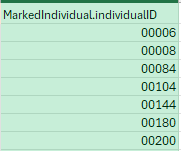
I am doing bulk imports in which the individuals are already known, so in the spreadsheet i have the field “MarkedIndividual.individualID” and the ID of the individuals are numerical, e.g. 00002, but when i do the bulk import Flukebook recognise it as “2” and I have to modify it by hand. There is any possibility for Flukebook to import from the spreadsheet as it appears?
This is how the ID are in my spreadsheet
The second one:
we have survey codes so I have added the field “Sighting.fieldSurveyCode” but it only recognises numbers, and in our case we have codes such as K02/25. There would be any option to add this type of survey codes?
Can you provide steps on how to reproduce what you’re experiencing?
If this is a bulk import report, send the spreadsheet to services@wildme.org with the email subject line matching your bug report
Thank you!!