Issues with Photo Uploads, Annotations, and MEWID Analysis Results

What Wildbook are you working in? IoT

I’m having some doubts about uploading photos, annotations, and the results from MEWID analysis. Several different situations are occurring:

Case 1:
I have an individual with only one side (lateral) documented. One file was uploaded, but it appears duplicated on the encounter page:

https://iot.wildbook.org/react/encounter?number=f31e75ef-2eea-4b36-bcc5-a982635e62b3

When I analyze it using HotSpotter, only one comparison appears:

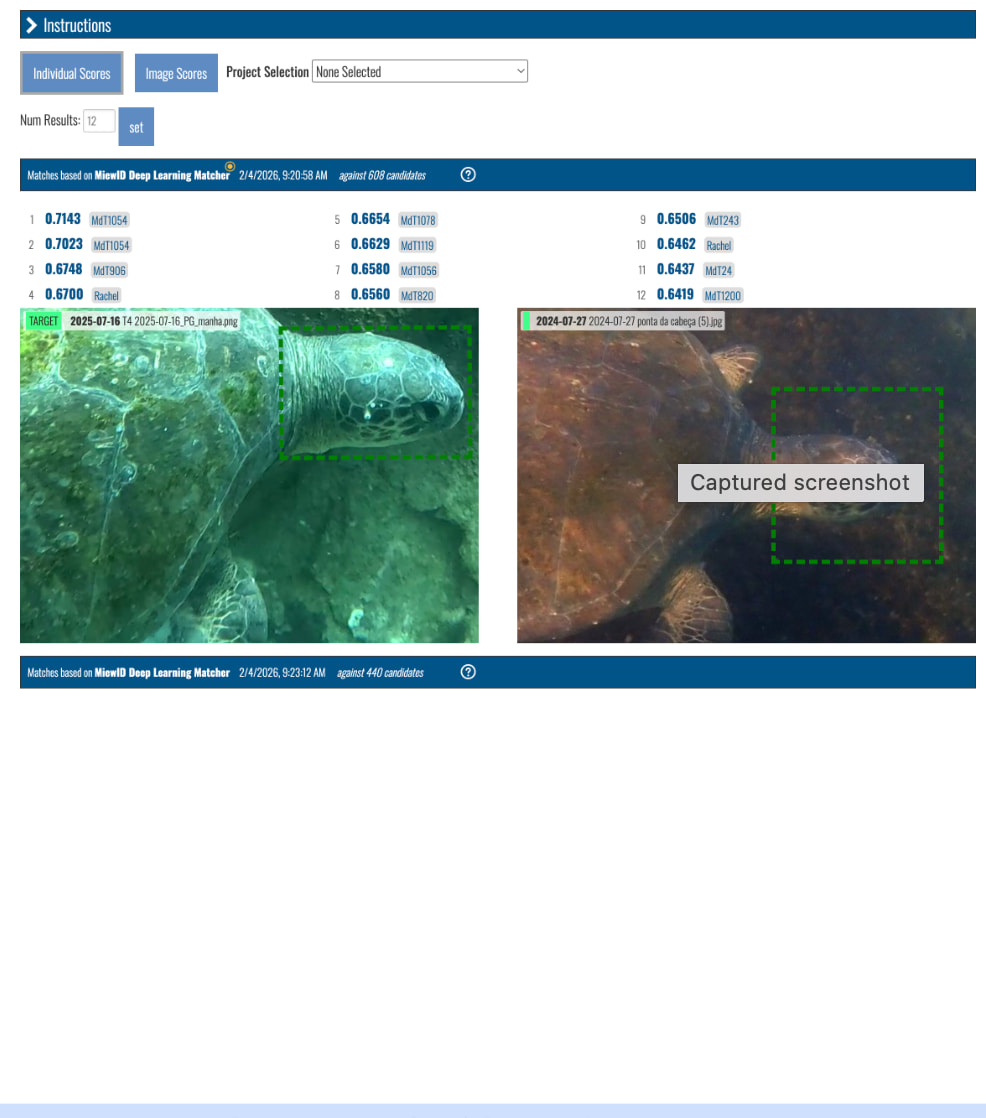
When I use MEWID, two comparisons appear with different results:

Case 2:
Another individual with only one side documented. One file was uploaded, but it also appears duplicated on the encounter page:

https://iot.wildbook.org/react/encounter?number=63681cae-3b19-4b37-b7b5-3e71f3d19204

Using HotSpotter:

Using MEWID, again two comparisons with different results appear:

Case 3:
An individual with both sides (laterals) documented. A separate file was uploaded for each side, but both appear duplicated on the encounter page:

https://iot.wildbook.org/react/encounter?number=90163b1b-e638-45fb-b306-fe0ec6e9b2a2

When analyzed with HotSpotter, only one comparison per side appears:

With MEWID, it also shows one comparison per side as expected:

These examples are for C. mydas, but I’ve noticed the same behavior with E. imbricata. It also seems to be happening across the entire image database.

My main questions are:

Why do I sometimes get two results and sometimes only one, even when only one lateral is registered?

In cases where two results are shown, which one should I consider—the top or the bottom result?

While getting two results seems more common with MEWID, I’ve also encountered this issue with HotSpotter.

Any insights or suggestions would be greatly appreciated. Thank you!
Hi @isabellaferreira

Thank you for the links and the detailed summaries!

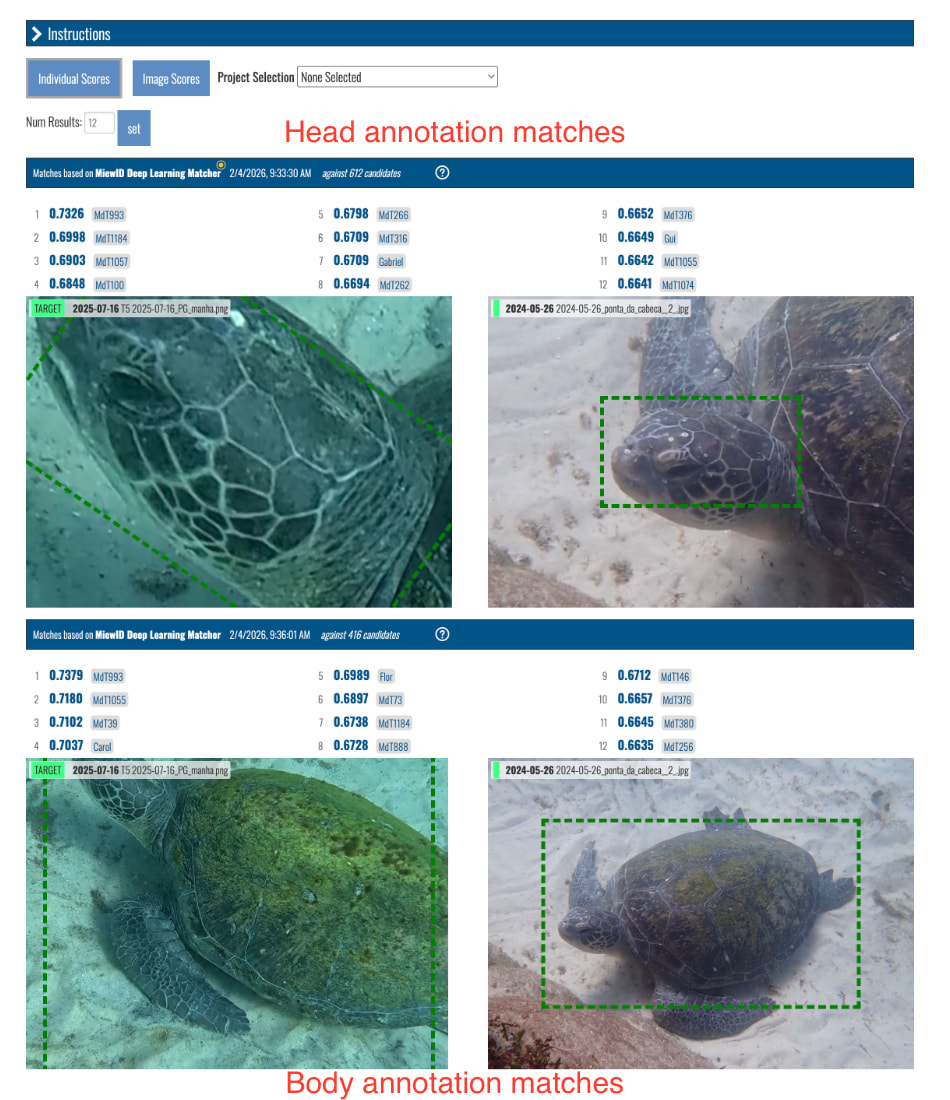
The image tiles represent each annotation on an image. Since every turtle uploaded gets a body and a head annotation, thats why you see it appear twice (it worked this way prior to the encounter page redesign, too).

I do see in your first example that the body annotation was removed. That should make the tile for it below disappear. I’ll investigate a little more while I discuss with our front end devs and get back to you.

For the double MiewID results for the same image, that does sound like a bug we’ve seen before. I need to spend more time digging into what the issue and solution was for that.

Thanks for your patience!

We have a ticket in progress about the multiple images in the encounter gallery. Soon, you’ll only see a single photo down there no matter how many annotations are on it: fix for: api (and other things) possibly returning duplicate MediaAssets by naknomum · Pull Request #1403 · WildMeOrg/Wildbook · GitHub

Since the default algorithm for this species is MiewID, it will run on both the head and body annotations as soon as detection completes. Head annotations will only match to other head annotations and body annotations are only matched to other bodies. Each matching task on the page represents either the head or the body match candidates.

When you manually start another match and select Hotspotter as your algorithm, it will only run identification on the selected annotation instead of all the annotations on the encounter. This may change in the future.

In your Case 1 example, since the MiewID match link was initially run when both the body and head annotation were present and the body annotation was deleted afterward, that page will show an empty spot where the match results for the body used to be.

Starting a new match on the head annotation gives you refreshed results for just the head. Each match attempt has its own unique task ID, so when you start a new match from the encounter page, clicking on the link will show you the latest results. Clicking on direct links to old match tasks shows the old match results.

I hope these explanations help. Let me know if you have more questions.