What is the entire URL out of the browser, exactly where the error occurred?
Can you describe what the issue is you’re experiencing?
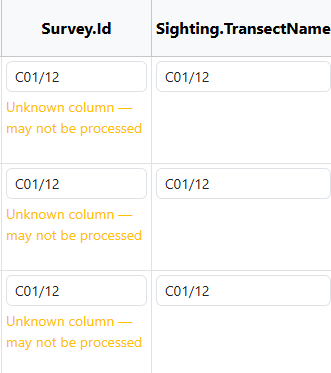
I am doing some preparation of data to do a bulk import and I have “survey.id” field in my excel sheet and what I have in there is “C01/12” but when I submit the excel into flukebook it tells me that the field is unknown but I do not know why.
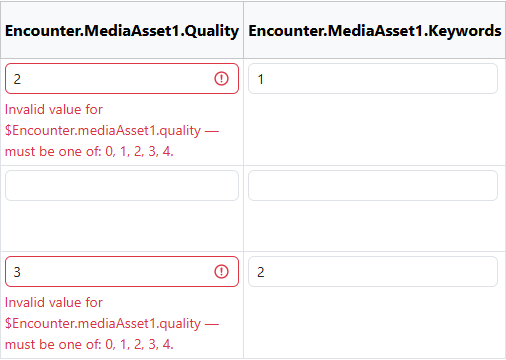
Also I am using the fields Encounter.MediaAsset1.Quality and Encounter.MediaAsset1.Keywords and it appears this errors when im doing the bulk import. But also when I have finished the bulk import and I go to the pictures of the individuals it does not appear both the quality and the keyword, it only appears one or the other
Thanks for sending your spreadsheet! The Survey.id field should start with a capital S. I’ll fix this in the docs. I see it’s listed in all overcase there.
The media asset quality fields are correct. If you place your cursor in the validation field where you see the error, press Enter on your keyboard and it accepts the value without changing it. This should help you get your import committed. I’m not sure why they’re being flagged, but it does accept the entred values with no additional changes.
Yes, you’ll see “1 Keyword” in the image section and when you click on the image to enlarge it, you’ll see the quality label next to the image and a button to add more keywords.