What Wildbook are you working in? Internet of Turtles
What is the entire URL out of the browser, exactly where the error occurred? not available sorry
Can you describe what the issue is you’re experiencing? The two new accounts I recently created in my organization, which have both orgAdmin and Researcher permissions, can’t add encounters to projects.
Can you provide steps on how to reproduce what you’re experiencing? First, they search for certain encounters (Encounter Search). They click on the ‘Project Management’ tab, but the ‘Select Projects to add to’ table isn’t populated at all (only three very narrow vertical cells). The summary table of projects within the organisation, which usually appears on the right side of the page, does not appear for them. NOTE: only these two new accounts have this problem; my account works normally.
If this is a bulk import report, send the spreadsheet to services@wildme.org with the email subject line matching your bug report
Can you also send me a message with the usernames that are experiencing this? Let them know I may need to temporarily change their passwords while I troubleshoot this.
Additionally, make sure they have any adblockers disabled on IoT. Sometimes they can block normal site elements from displaying when they’re enabled.
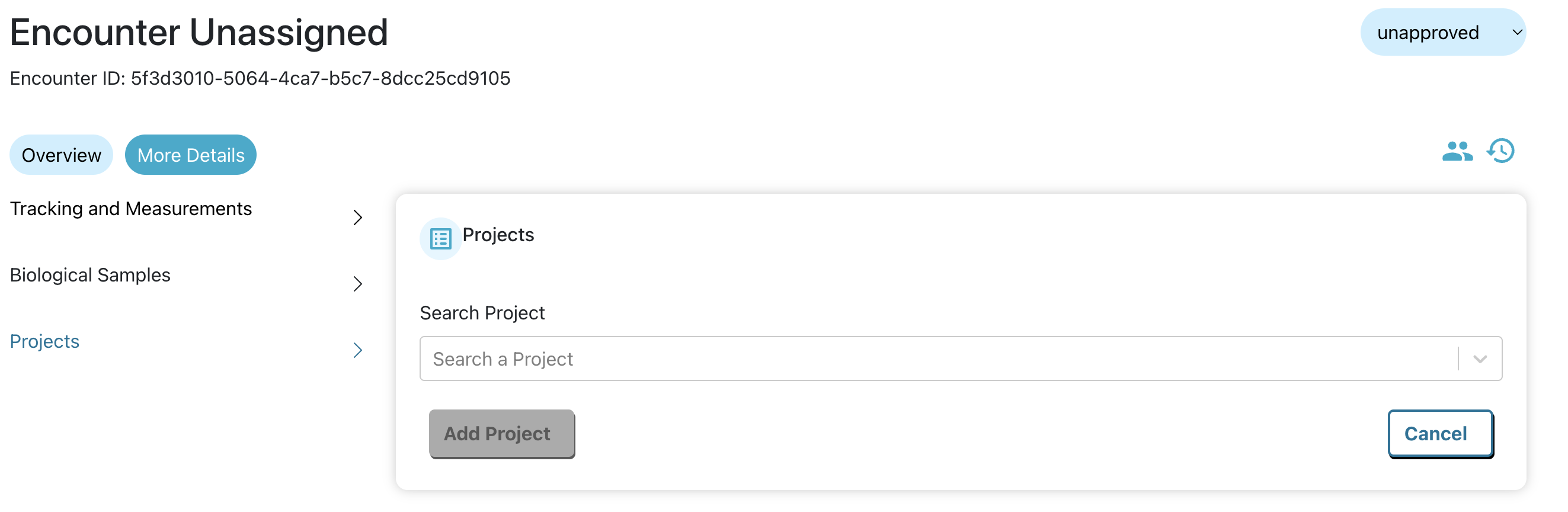
Edited to add: I just realized IoT was recently upgraded to Wildbook 10.9.2. Make sure to do a hard refresh in your browser to see the latest updates (CTRL + R on PC, CMD + R on Mac). In the meantime, they can add to projects directly from the new encounter page using the More Details tab and clicking on Projects:
Thank you so much for your help. I’ve checked with the users, and we’ve figured out the problem came from me not having added them manually to the projects in the organisation. I’ve done that, and the issue is fixed.
I have another question about that but you can consider this issue resolved.